


DICENTIS Wireless
Secure, interference-free Wi-Fi conferencing that is quick to install and easy to reposition
DICENTIS Wireless
Secure, interference-free Wi-Fi conferencing that is quick to install and easy to reposition
Bosch DCNM-LSDU Product Highlights
Explore what the Bosch DCNM-LSDU Dual Use License adds to a DICENTIS Wireless DCNM-WD or DCNM-WDE.Two Participants, One Device
Two participants share one DCNM-WD or DCNM-WDE, one on each side.
Own Request Button
Each participant switches the microphone with their own request button, just like a single-user device.
Names in the Speaker List
Both names show correctly in the speaker list and with the camera image.
Speak and Wait
One participant can speak while the other waits in the request list.
Works with ID and Voting
On a DCNM-WDE, add two DCNM-LSID or two DCNM-LSVT licenses so both participants can log in or vote.
Simple Activation
One license per device, delivered as an activation code by e-mail and activated in the DCNM-WAP web interface.
Key specs
- Dual use on DCNM-WD and DCNM-WDE
- One license per device
- Own request button per participant
- Both names shown in the speaker list
- Activated in the DCNM-WAP web interface
- Activation code by e-mail
Know before you buy
Quick answers about the DCNM-LSDU, and how it compares.
How does dual use work?
Each participant switches their microphone on and off with their own request button, which works just like a single-user device. One can speak while the other is on the request list, and both names show correctly in the speaker list and with the camera image.
Can both participants log in or vote?
Which licenses does DICENTIS Wireless use?
Discussion works without a license. These functions are added with licenses, activated in the DCNM-WAP web browser interface:
| Function | License | How many |
|---|---|---|
| Dual use: two participants share one device | DCNM-LSDU | One per WD or WDE |
| Identification by NFC card | DCNM-LSID | One per WDE, two in dual use |
| Voting at the seat | DCNM-LSVT (ask us) | One per WDE, two in dual use |
| Camera prepositions per seat | DCNM-LCC (ask us) | One per WAP |
Identification and voting work on the DCNM-WDE only. Each license is delivered as an activation code by e-mail.
What do I need for a DICENTIS Wireless system?
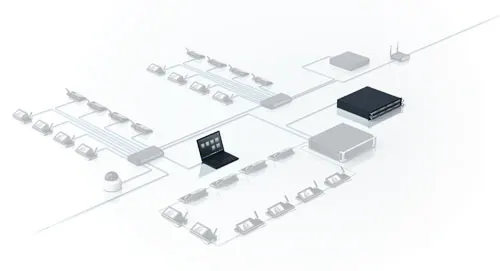
DICENTIS Wireless runs stand-alone, with no central control unit. You need:
- One DCNM-WAP access point: controls up to 120 DICENTIS devices. You set up and run the meeting from its web browser interface on a tablet or laptop.
- A wireless device per seat: DCNM-WD for discussion, or DCNM-WDE with a touch screen and NFC reader.
- A microphone per device: DCNM-HDMIC, DCNM-MICS or DCNM-MICL.
- A battery pack per device: DCNM-WLIION2, charged five at a time in the DCNM-WCH05.
- Optional licenses for dual use, identification, voting and camera control.
Typical coverage is 30 x 30 m per access point. A second WAP can be set up as a secondary access point for redundancy and meeting continuity.
Who supplies Bosch DICENTIS in the UAE, and what warranty do I get?
Protechtors General Trading LLC (hik.ae) is an authorized partner of Bosch, Dynacord and Electro-Voice in the UAE, so everything we supply is genuine and comes with a 3-year warranty. Warranty is carry-in: bring the unit to our office in Dubai and after inspection it is repaired or replaced as needed.
We supply Bosch DICENTIS across the UAE and support you after the sale. Prices are quoted per project: tell us what you need and we will send a quote.