

DICENTIS Conference System
Revolutionary IP-based platform for the integrated conference world of tomorrow
DICENTIS Conference System
Revolutionary IP-based platform for the integrated conference world of tomorrow
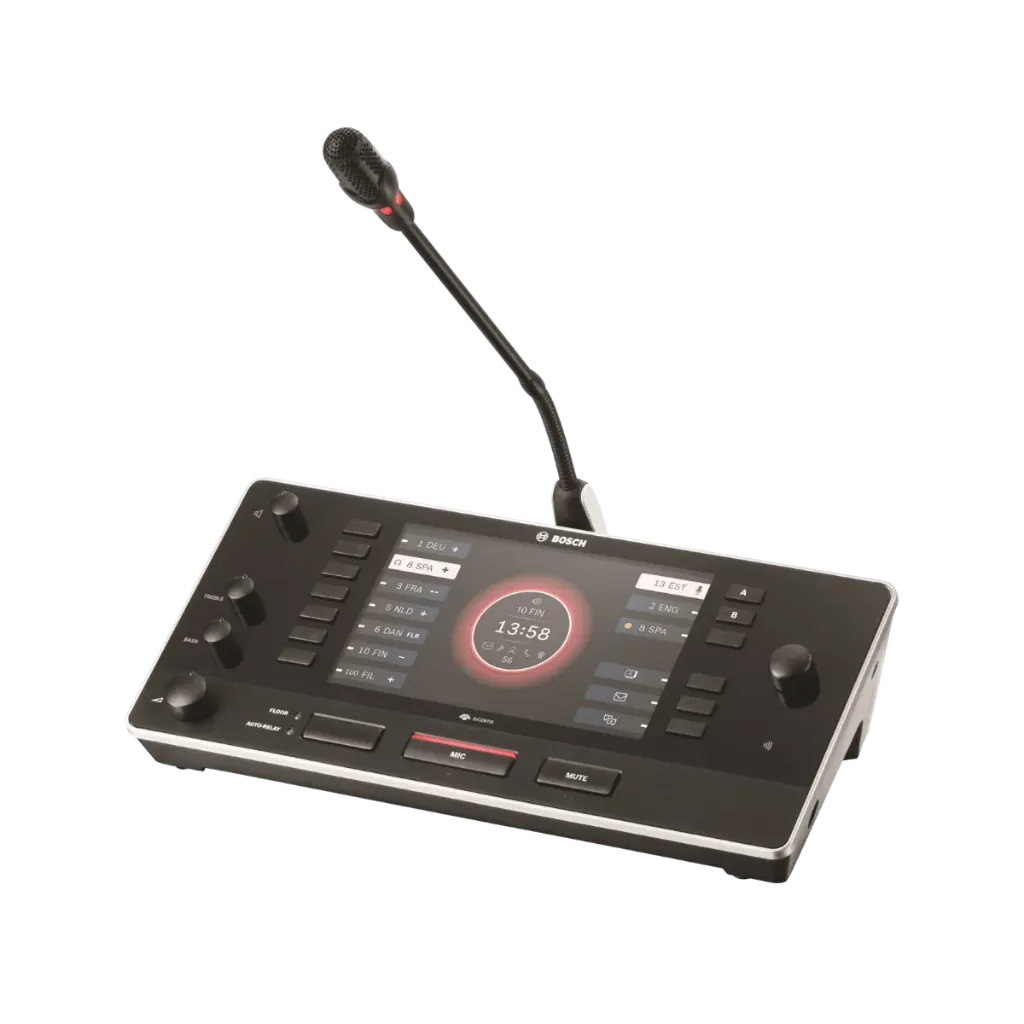
Bosch DCNM-IDESKVID Product Highlights
Explore the key capabilities of the Bosch DCNM-IDESKVID Interpreter Desk with Video Output, including multilingual interpretation, HDMI video, intuitive controls, flexible connectivity and professional interpreter support.Supports Up to 100 Languages
Designed for professional interpretation environments with support for up to 100 languages.
7-Inch High-Contrast Display
Features a 7-inch TFT display for clear access to language, timing and interpreter information.
HDMI Video Output
Provides HDMI output for an external screen, allowing the interpreter to view the active speaker or participant presentation.
Flexible Network Connectivity
Dual RJ45-compatible connections support DICENTIS loop-through cabling or star-network installation using Cat.5e or better with PoE+.
Professional Interpreter Controls
Includes dedicated controls for language selection, microphone, mute, headphone volume, tone, floor/auto-relay and video source selection.
Accessibility & Hearing Protection
Supports hearing protection, tactile feedback and audible feedback features to improve comfort and usability for interpreters.
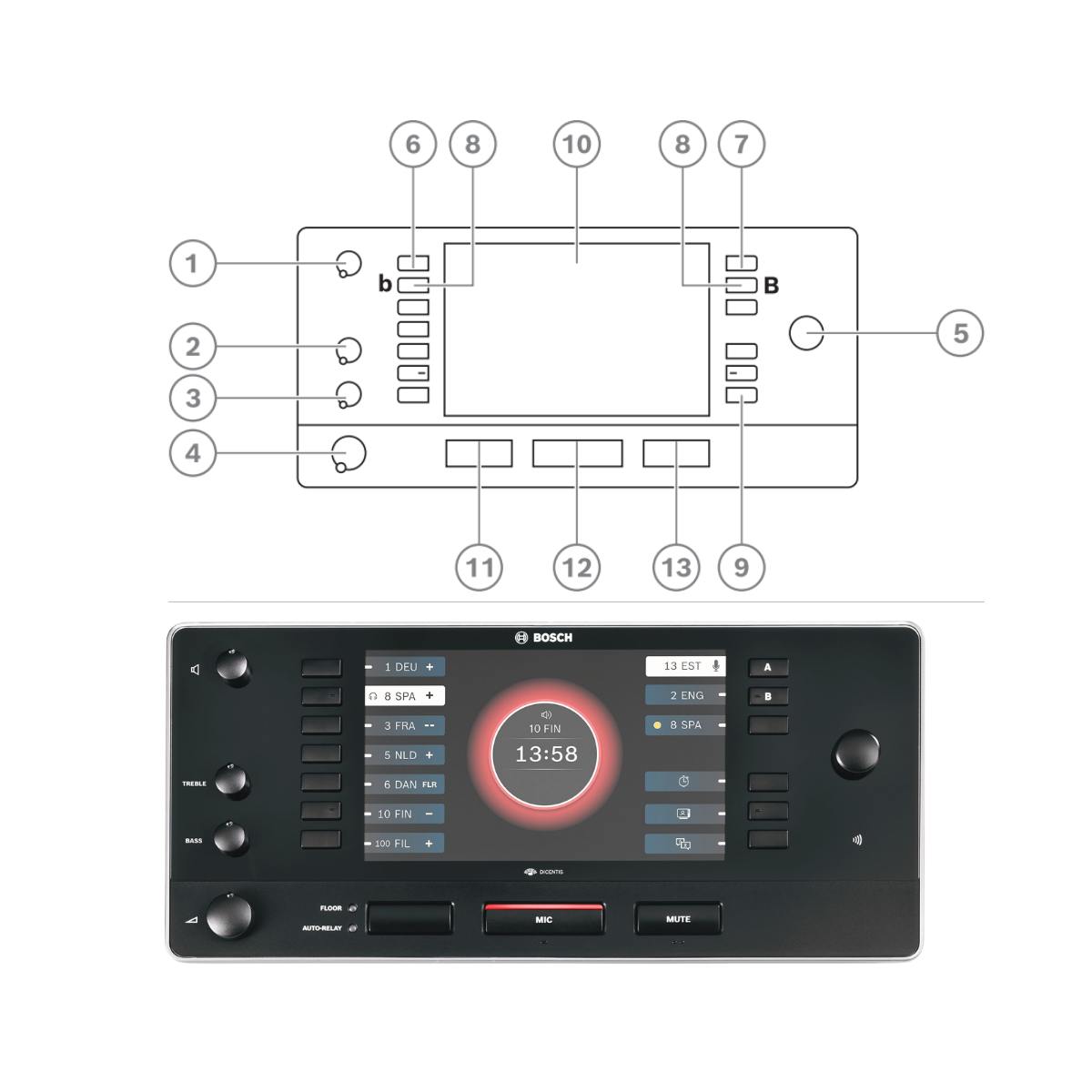
DCNM-IDESKVID Controls & Functions
Understand the main controls of the Bosch DCNM-IDESKVID Interpreter Desk, including audio adjustment, language selection, microphone operation, relay control and programmable functions.
DCNM-IDESKVID Connectivity & Installation
View the key connection and mounting points of the Bosch DCNM-IDESKVID, including dual RJ45 system connections, HDMI video output, USB interface and fixed-installation mounting point.
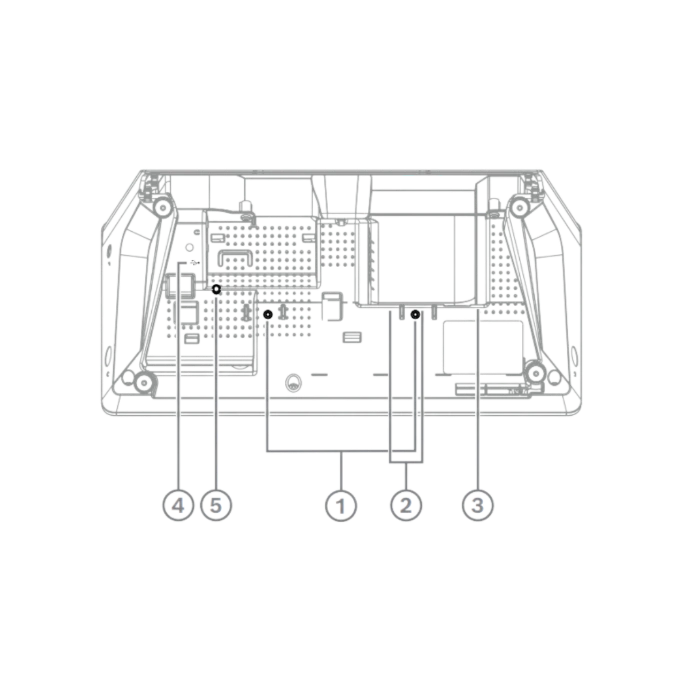
1. Fixed Installation
Use the screw insert for fixed tabletop installation. The desk may also be used free-standing. For fixed mounting, use M3 screws with a maximum insertion depth of 5 mm (0.2 in) to avoid damaging the device.
2. RJ45 System Connections
Two RJ45-compatible input/output connections provide system communication and power. The desk supports loop-through cabling with DICENTIS system cables or star cabling using standard CAT-5e cables and PoE switches.
3. HDMI Video Output
The DCNM-IDESKVID includes a dedicated HDMI video output for connecting an external display.
4. USB Interface
The USB connector is used for the DCNM-IDESKINT On-air & Telephone Interface.
5. Reset Button
Press and hold the reset button for more than 10 seconds to restore the interpreter desk to its factory default settings.
Key specs
- HDMI out: speaker or presentation
- HDMI 1.4, 1080p60/50, 720p60/50
- 7-inch high-contrast display
- Up to 100 languages, 10 desks per booth
- 7 relay presets, A/B/C outputs
- ISO 20109:2016 compliant
- Socket for DCNM-MICS or MICL
- System cable or PoE+, 18 W
- 104 x 326 x 168 mm, 1540 g
Bosch DCNM-IDESKVID Interpreter Desk Technical Specifications
| Category | Specification | Official Value |
|---|---|---|
| General | Product type | Interpreter desk with video output |
| System | DICENTIS | |
| Display size | 7 in | |
| Display type | TFT | |
| Supported languages | Up to 100 languages | |
| Desks per booth | Up to 10 | |
| Video Output | HDMI resolution | 1080p60, 1080p50, 720p60, 720p50 |
| HDMI version | 1.4 | |
| H.264 decoding latency | 50 ms | |
| Connections | Headphone / headset sockets | 3 × 3.5 mm TRRS |
| Network / system connections | 2 × RJ45-compatible | |
| Network cabling | DICENTIS system cable or Cat.5e or better | |
| Power over Ethernet | PoE+ IEEE 802.3at Class 4 | |
| USB | 1 × USB connector, future use | |
| Microphone connection | For DCNM-MICS / DCNM-MICL | |
| External video output | HDMI | |
| Electrical | Input voltage | 48 VDC |
| Power consumption | 18 W | |
| Frequency response | 100 Hz – 20,000 Hz | |
| Audio Inputs | Nominal acoustic input level | 80 dB SPL according to EN ISO 22259 |
| Maximum acoustic input level | 110 dB SPL according to EN ISO 22259 | |
| Nominal input level | -38 dBV | |
| Maximum input level | -8 dBV | |
| Audio Outputs | Nominal acoustic output level | 72 dB SPL |
| Nominal output level | -3 dBV | |
| Maximum output level | 0 dBV | |
| Headphone load impedance | >32 ohm and <1 kohm per earpiece | |
| Maximum output power | 65 mW | |
| Mechanical | Mounting type | Tabletop |
| Dimensions (H × W × D) | 10.40 × 32.60 × 16.80 cm | |
| Dimensions (H × W × D) | 4.09 × 12.83 × 6.61 in | |
| Slope | 30° | |
| Weight | 1540 g / 3.40 lb | |
| Colour | RAL 9017 Traffic Black | |
| Environmental | Operating temperature | 5 °C – 35 °C / 41 °F – 95 °F |
| Storage temperature | -30 °C – 70 °C / -22 °F – 158 °F | |
| Operating relative humidity | 5% – 90%, non-condensing | |
| Identification | CTN / Model | DCNM-IDESKVID |
| Product Number | F.01U.326.553 |
Know before you buy
Quick answers about the DCNM-IDESKVID, and how it compares.
DCNM-IDESK or DCNM-IDESKVID?
| DCNM-IDESK | DCNM-IDESKVID | |
|---|---|---|
| HDMI video output | No | Yes: shows the participant speaking or their presentation, up to 1080p |
| Quick buttons (default) | Clock, language overview | Clock, video source, language overview |
| Power consumption | 15 W | 18 W |
| Weight | 1500 g | 1540 g |
Everything else is the same: 7-inch high-contrast display, up to 100 languages, up to ten desks per booth, 7 relay presets, ISO 20109:2016. Choose the IDESKVID when interpreters should see the speaker or the presentation on a screen.
What does the HDMI output show?
A screen connected to the HDMI output shows either the participant speaking or the participant's presentation; the interpreter switches with the video source button on the desk. HDMI 1.4 at 1080p60, 1080p50, 720p60 or 720p50, with about 50 ms decoding delay. Use a shielded high-speed HDMI cable.
What can the interpreter control at the desk?
- Languages: 7 relay presets showing number, abbreviation and quality, and A, B (and C) output buttons showing selection, state and engaged languages. Floor / auto-relay button with LEDs.
- Microphone: microphone button with red on-air and green "booth not in use" LEDs, a mute button, and a red on-air LED at the rear.
- Listening: headphone volume, bass and treble, and loudspeaker volume.
- Setup: a rotary control with push button, and language and system configuration from the desk's own menu.
All controls give tactile feedback, with audible feedback and raised dots for visually impaired interpreters.
Which microphone and headphones can be used?
The desk takes a DCNM-MICS (short) or DCNM-MICL (long) stem microphone, ordered separately.
It has three 3.5 mm headphone / headset sockets (left, right and bottom) and switches to the headset microphone automatically. Hearing protection works with the Bosch HDP-IHDP interpreter headphones and HDP-IHDS interpreter headset (ask us), Bosch LBB3443, HDP-LWN and HDP-HQ, and listed models from Sennheiser, AKG, Shure, Bang and Olufsen and others.
How is the desk connected and powered?
Two RJ45 sockets carry system data and power: loop-through with DICENTIS system cables, or star cabling with Cat. 5e (or better) and PoE+ switches (IEEE 802.3at class 4). 48 VDC, 18 W. Hot plug and play.
Tabletop, 30° slope, 104 x 326 x 168 mm, RAL 9017 Traffic black. In the box: the desk, a quick installation guide and a CE information sheet.
How does interpretation work on DICENTIS?
Interpreters work at DCNM-IDESK or DCNM-IDESKVID desks, up to ten per booth, for up to 100 languages. The desks join the DICENTIS system like any other device: DICENTIS system cables with loop-through, or star cabling with Cat. 5e (or better) and PoE+ switches. Hot plug and play.
Participants hear the interpretation:
- On their own seat: language selection on the DCNM-DE, DCNM-DSL or DCNM-FSLP, with a Premium license per participant.
- On infrared receivers: through Bosch INTEGRUS with the INT-TXO transmitter (ask us).
- Over Dante: with the DCNM-LDANTE license.
Does interpretation need a software license?
No. Interpreting from the DCNM-IDESK and DCNM-IDESKVID works without a license once the system is registered.
The Ultimate license (one per participant) adds:
- Interpretation settings per meeting, also from the Meeting Application.
- Interpreting control from Synoptic.
- An interface for interpreting control from a non-DICENTIS source, such as remote simultaneous interpretation (RSI).
- Free choice of the desk's quick buttons: language overview, clock, speak slow notification, headphone selection, and video source on the IDESKVID.
Participants who choose their language on their own device need a Premium license.
Who supplies Bosch DICENTIS in the UAE, and what warranty do I get?
Protechtors General Trading LLC (hik.ae) is an authorized partner of Bosch, Dynacord and Electro-Voice in the UAE, so everything we supply is genuine and comes with a 3-year warranty. Warranty is carry-in: bring the unit to our office in Dubai and after inspection it is repaired or replaced as needed.
We supply Bosch DICENTIS across the UAE and support you after the sale. Prices are quoted per project: tell us what you need and we will send a quote.