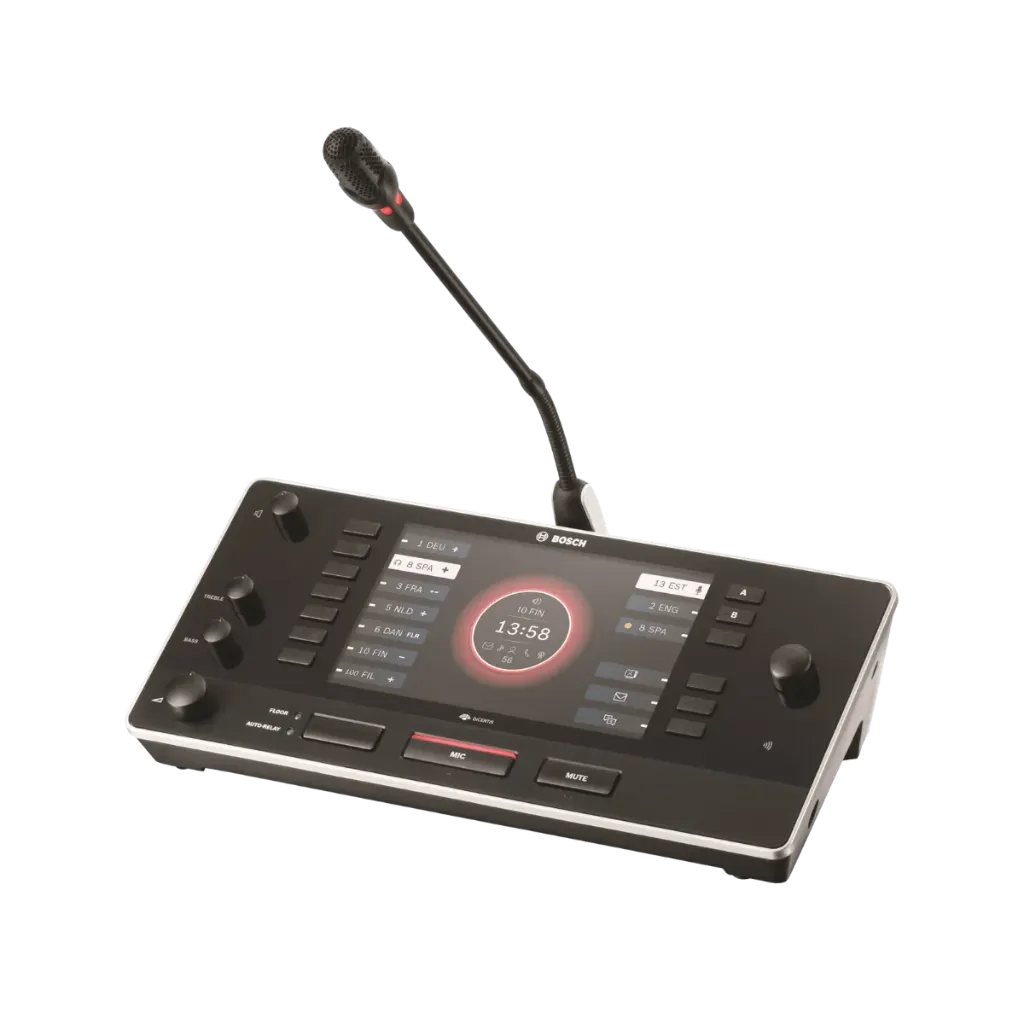


DICENTIS Conference System
Revolutionary IP-based platform for the integrated conference world of tomorrow
DICENTIS Conference System
Revolutionary IP-based platform for the integrated conference world of tomorrow
Bosch DCNM-IDESK Product Highlights
Explore the key capabilities of the Bosch DCNM-IDESK Interpreter Desk, including multilingual interpretation, intuitive controls, flexible connectivity and professional interpreter support.Supports Up to 100 Languages
Designed for professional interpretation environments with support for up to 100 languages.
7-Inch High-Contrast Display
Features a 7-inch TFT display for clear access to language, timing and interpreter information.
ISO 20109:2016 Compliant
Meets ISO 20109:2016 for simultaneous interpreting equipment, with up to ten desks per booth.
Flexible Network Connectivity
Dual RJ45-compatible connections support DICENTIS loop-through cabling or star-network installation using Cat.5e or better with PoE+.
Professional Interpreter Controls
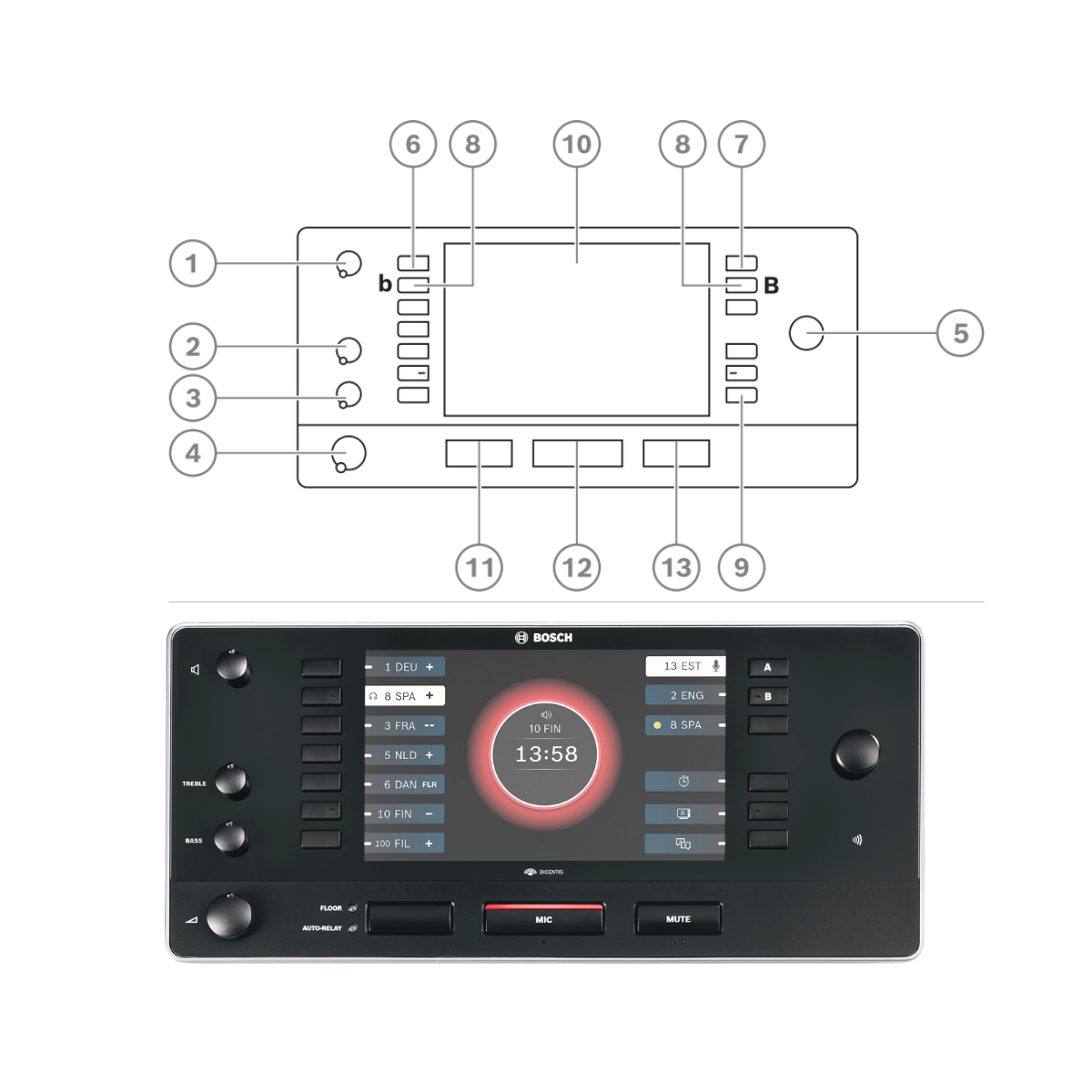
Includes dedicated controls for language selection, microphone, mute, headphone volume, tone and floor/auto-relay.
Accessibility & Hearing Protection
Supports hearing protection, tactile feedback and audible feedback features to improve comfort and usability for interpreters.
DCNM-IDESK Controls & Functions
Understand the main controls of the Bosch DCNM-IDESK Interpreter Desk, including audio adjustment, language selection, microphone operation, relay control and programmable functions.
DCNM-IDESK Connectivity & Installation
View the key connection and mounting points of the Bosch DCNM-IDESK, including dual RJ45 system connections, USB interface and fixed-installation mounting point.
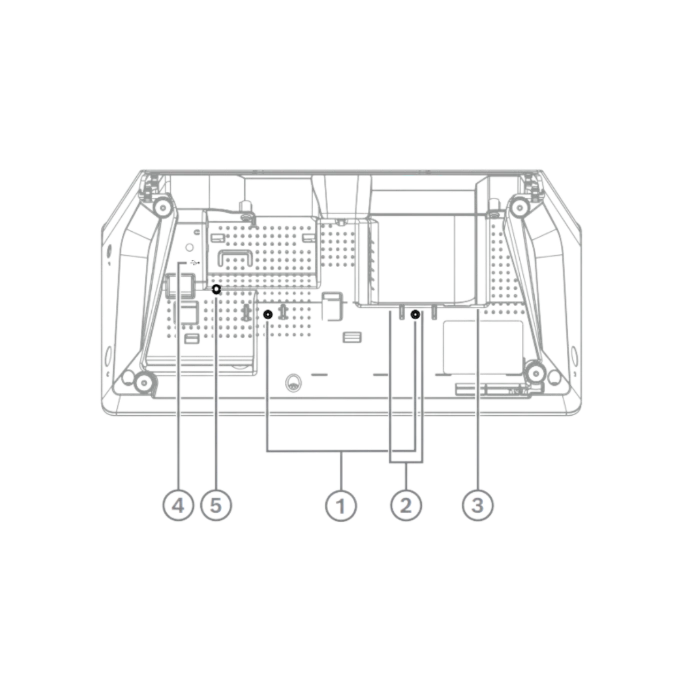
1. Fixed Installation
Use the screw insert for fixed tabletop installation. The desk may also be used free-standing. For fixed mounting, use M3 screws with a maximum insertion depth of 5 mm (0.2 in) to avoid damaging the device.
2. RJ45 System Connections
Two RJ45-compatible input/output connections provide system communication and power. The desk supports loop-through cabling with DICENTIS system cables or star cabling using standard CAT-5e cables and PoE switches.
3. HDMI Video Output
The HDMI video output is only available on the DCNM-IDESKVID; the DCNM-IDESK has none.
4. USB Interface
The USB connector is used for the DCNM-IDESKINT On-air & Telephone Interface.
5. Reset Button
Press and hold the reset button for more than 10 seconds to restore the interpreter desk to its factory default settings.
Key specs
- 7-inch high-contrast display
- Up to 100 languages, 10 desks per booth
- 7 relay presets, A/B/C outputs
- ISO 20109:2016 compliant
- 3 headset sockets, hearing protection
- Socket for DCNM-MICS or MICL
- System cable or PoE+, 15 W
- 104 x 326 x 168 mm, 1500 g
Electrical | |
Supply Voltage | 100-240 Vac +/- 10% 50/60 Hz |
Maximum Power Consumption | 300 W |
Mechanical | |
Dimensions (H x W x D) | 340 x 195 x 82 mm (13.4 x 7.6 x 3.2 in) |
Weight (without batteries) | 1.8 kg (3.97 lb) |
Color | Traffic black (RAL 9017) |
Environmental | |
Operating Temperature | 5 ºC to +45 ºC (41 ºF to +113 ºF) |
Storage and Transport temperature | -20 ºC to +70 ºC (-4 ºF to +158 ºF) |
Relative Humidity | < 95 %, > 5 % |